


Download Zip Unzip By Click – Free, Secure, One-Click Zip & Unzip Tool for Windows & Mac
Zip Unzip By Click is a lightweight, no-frills software designed for users who need a simple way to manage ZIP files. This free tool allows you to quickly compress and decompress ZIP archives with just a single click. Ideal for beginners or those who prefer minimalistic tools, it automatically sets up file associations for .ZIP files, so you can double-click any archive and extract it instantly.
While it lacks support for other archive formats like RAR, 7Z, or TAR, its simplicity makes it a solid choice for basic tasks. The interface is clean and straightforward—no complex settings, no configuration options, just drag-and-drop functionality. Despite its limitations, Zip Unzip By Click offers a secure, fast, and hassle-free experience for handling small ZIP files.
If you're looking for a reliable, free, and easy-to-use archive tool that won’t clutter your system, this app is worth considering.
Key Features of Zip Unzip By Click
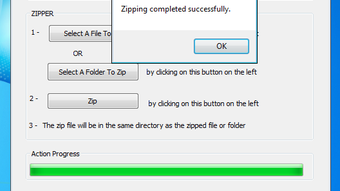
Zip Unzip By Click delivers a streamlined experience focused on core functionality. Its primary strength lies in its simplicity—there are no menus, no preferences, and no complicated workflows. The moment you install it, it integrates seamlessly with your system by creating a file association for .ZIP files. This means you can simply double-click any ZIP file, and the program will launch automatically to extract its contents. The interface is minimal, consisting of a single window where you can either drag and drop your ZIP file or use the import button to browse and select the archive.
One of the standout features is the built-in progress bar, which visually tracks the extraction process, providing real-time feedback. This is especially helpful for users who want to know how long the operation will take. The tool supports both unzipping and zipping—though zipping requires you to manually import files into the app rather than using right-click context menus. While this may be a minor inconvenience, it keeps the interface clean and uncluttered.
Another notable feature is its lightweight footprint. Zip Unzip By Click doesn’t consume much system memory or processing power, making it suitable for older computers or low-spec devices. It also runs without requiring admin rights, ensuring a smooth installation and usage experience. The software is completely free, with no ads, no trial periods, and no hidden costs. For users who only need to handle small ZIP files and don’t require advanced features, this tool offers a secure and efficient solution.
- One-click unzipping with automatic file association
- Simple drag-and-drop interface
- Supports ZIP file compression and extraction
- Lightweight and fast performance
- Free to download and use with no ads
- Progress bar for real-time extraction tracking
- Compatible with Windows and Mac systems
How to Install and Use Zip Unzip By Click
Installing Zip Unzip By Click is a quick and straightforward process. Begin by downloading the software from a trusted source. The installer is small, typically under 5MB, and completes the setup in under a minute. During installation, the program automatically configures file associations for .ZIP files, meaning your system will recognize ZIP archives and launch Zip Unzip By Click when you double-click them.
Once installed, launching the app opens a minimalist window with a single button labeled “Import.” To extract a file, simply click this button, navigate to your ZIP archive, and select it. The tool will begin extracting the contents to a default folder—usually the same directory as the ZIP file. You can monitor the progress via the visible progress bar.
If you want to create a new ZIP file, you must first import the files you wish to compress. Then, use the “Zip” function (if available in the interface) to generate a compressed archive. Note that there’s no right-click integration, so you can’t zip files directly from the file explorer.
For optimal performance, it’s recommended to use Zip Unzip By Click with small files—ideally under 100KB. The software has a known limitation: it may not process files larger than this size without requiring registration. While this is a significant constraint for power users, it’s not a major issue for casual users who only need to extract quick, small archives. Always ensure your antivirus software is active when handling compressed files to maintain a secure environment. Regularly check for updates via the official website to ensure you’re using the latest version with improved stability and security patches.
Compatibility and System Requirements
Zip Unzip By Click is designed to run on a wide range of operating systems, making it accessible to most users. It supports both Windows 7 and later versions, including Windows 10 and Windows 11, ensuring compatibility with modern desktop environments. For Mac users, the software is available for macOS 10.12 (Sierra) and above, including the latest Apple Silicon (M1/M2) chips, offering native performance without the need for emulation.
The app is available as a standalone executable file, so there’s no need to install additional dependencies or runtimes. It requires minimal system resources—just 10MB of free disk space and 50MB of RAM to operate smoothly. This makes it ideal for older machines, netbooks, or devices with limited storage. The software is also compatible with both 32-bit and 64-bit systems, ensuring broad accessibility.
Despite its simplicity, Zip Unzip By Click maintains a high level of security. It does not collect user data, access the internet without permission, or install third-party components. All file operations are performed locally, which enhances privacy and reduces the risk of malware exposure. The app is regularly updated to patch vulnerabilities and improve compatibility with new OS versions. For users who value privacy and minimalism, this tool is a secure and reliable choice.
- Windows 7, 8, 10, 11 (32-bit & 64-bit)
- macOS 10.12 (Sierra) and later (Intel & Apple Silicon)
- 10MB free disk space
- 50MB RAM minimum
- Secure, offline file processing
- No internet connection required
Pros and Cons of Zip Unzip By Click
Like any software, Zip Unzip By Click has its strengths and weaknesses. Understanding these can help you decide if it’s the right tool for your needs.
Pros
- Extremely simple interface – No learning curve; ideal for beginners and non-tech users.
- Free to download and use – No trial limits, no ads, no hidden fees.
- Fast and lightweight – Uses minimal system resources, perfect for older or low-end devices.
- Automatic file association – Double-clicking ZIP files launches the app instantly.
- Secure and private – No data collection, no internet access required.
Cons
- Limited to ZIP format only – Cannot handle RAR, 7Z, TAR, or other archive types.
- No right-click integration – Cannot zip or unzip files directly from file explorer.
- File size limit – Struggles with files over 100KB without registration.
- No advanced features – Lacks password protection, split archives, or encryption options.
- Outdated appearance – Interface looks basic compared to modern tools.
Frequently Asked Questions (FAQ)
Here are some common questions users have about Zip Unzip By Click:
-
Is Zip Unzip By Click really free?
Yes, Zip Unzip By Click is completely free to download, install, and use. There are no trial periods, no ads, and no hidden costs. The software is open for personal and commercial use without restrictions.
-
Can I use Zip Unzip By Click on Mac?
Yes, Zip Unzip By Click supports macOS 10.12 and later, including Apple Silicon (M1/M2) Macs. The app is available as a native installer for Mac users.
-
Why can’t I extract larger ZIP files?
The software has a built-in limitation: it only processes files smaller than 100KB without requiring registration. For larger archives, you may need to use a more advanced tool like 7-Zip or WinRAR.
-
Does Zip Unzip By Click support RAR or 7Z files?
No, Zip Unzip By Click only supports the .ZIP file format. It does not handle RAR, 7Z, TAR, or other compressed formats.
-
Is the software secure?
Yes, Zip Unzip By Click is secure. It runs offline, doesn’t collect data, and doesn’t require internet access. It’s recommended to download it only from the official website to avoid malicious versions.
Conclusion: Is Zip Unzip By Click Worth It?
Zip Unzip By Click is a no-nonsense tool for users who want a simple, fast way to handle ZIP files. While it lacks advanced features and supports only one file format, its minimal design and ease of use make it perfect for beginners or those who need a quick fix without complexity. If you’re working with small ZIP files and don’t need encryption, password protection, or multi-format support, this app delivers exactly what it promises.
However, for users who frequently work with large archives or need to manage multiple formats, tools like 7-Zip, PeaZip, or WinRAR offer far greater functionality. Still, if simplicity and speed are your top priorities, Zip Unzip By Click is a reliable, free, and secure option.
Download Zip Unzip By Click today and experience hassle-free file compression and extraction—perfect for quick tasks and minimal workflows.







